
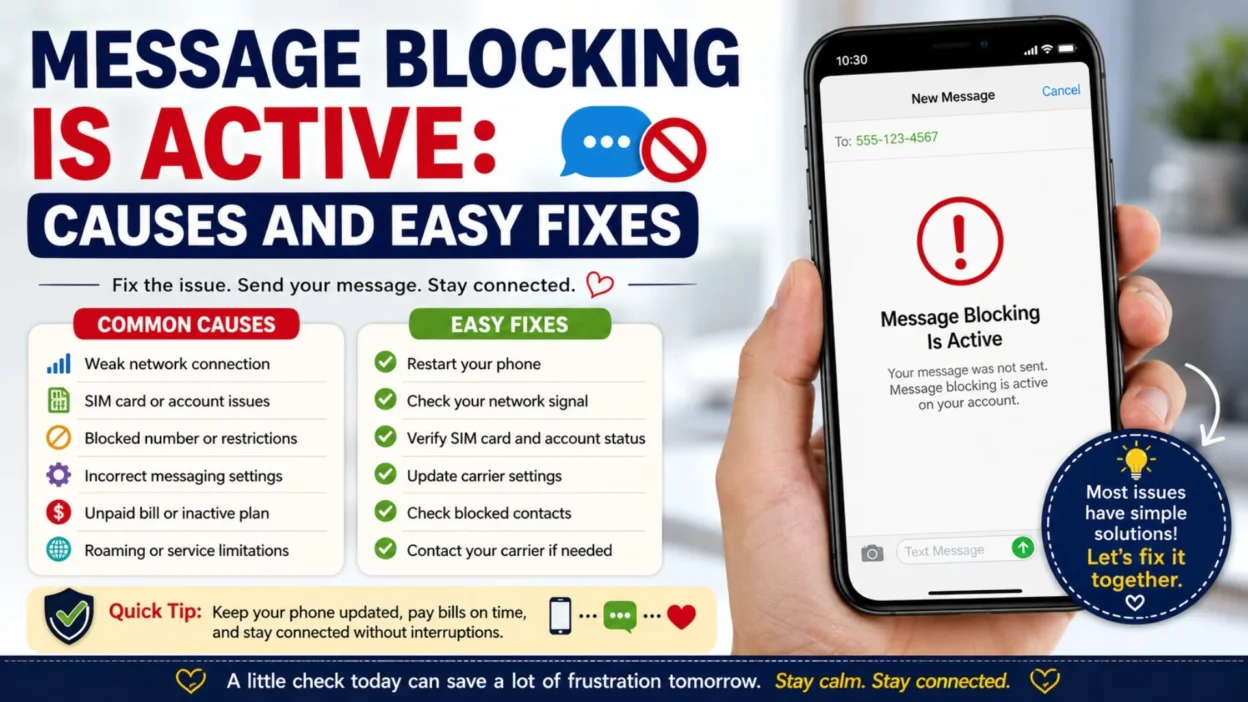
Seeing the message blocking is active error can be frustrating, especially when you need to send an important text. One moment everything works normally, and the next, your message refuses to go through.
Sometimes, we all rely on text messages to stay connected with family, friends, coworkers, or customers. Therefore, when this error suddenly appears, it can feel confusing and stressful. The good news is that, in most cases, the problem has a simple explanation and an easy solution.
Whether you use an Android phone or an iPhone, this guide explains what message blocking is active means, why it happens, and the practical steps you can take to restore your messaging service.
📱 What Does Message Blocking Is Active Mean?
The message blocking is active error means your mobile carrier or phone is preventing a text message from being sent.
This usually affects SMS or MMS messages rather than internet-based messaging apps.
💡 In Simple Words
Your phone tries to send a message.
However, something blocks the request before it reaches the recipient.
That restriction may come from your carrier, your account, your device settings, or the recipient’s number.
“The error does not always mean your phone is broken. In many cases, it points to a setting or account issue.”
🌟 Why the Message Blocking Is Active Error Happens
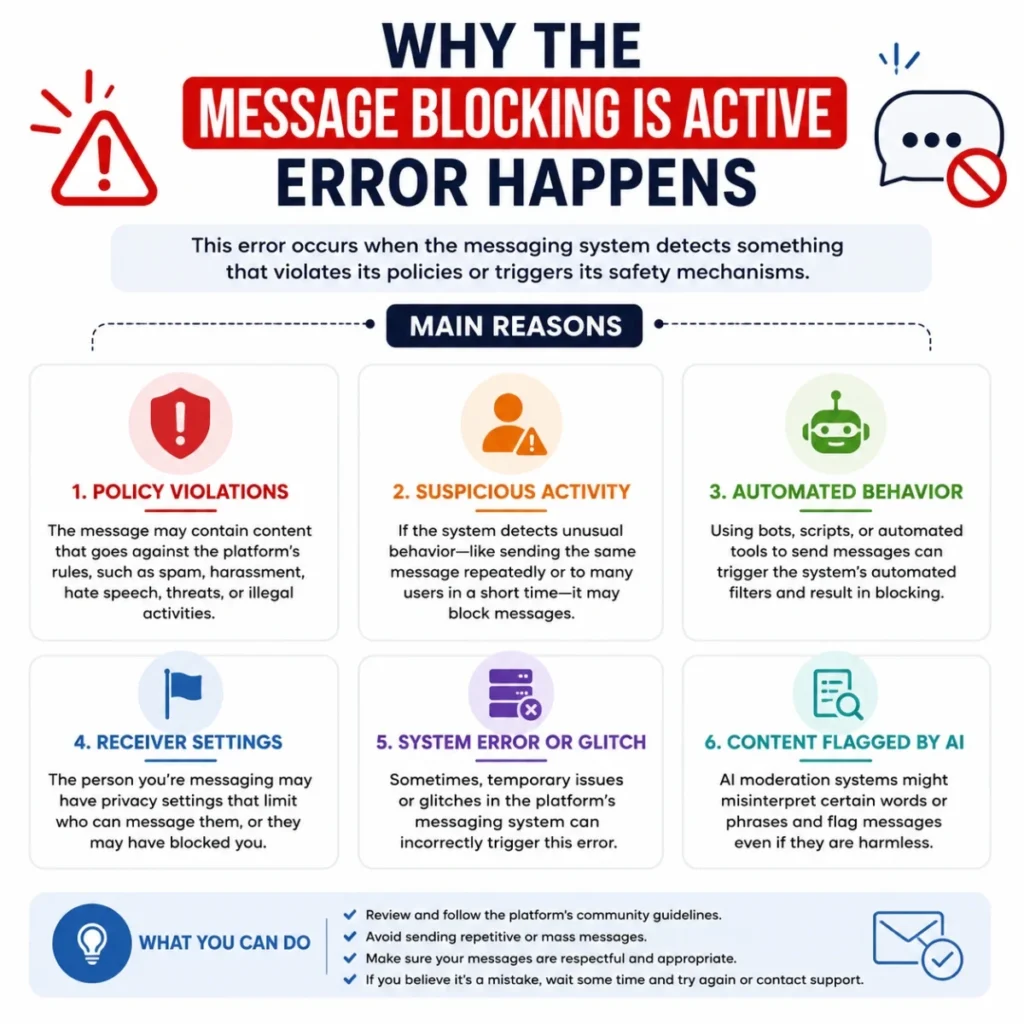
Several different issues can trigger this message.
Therefore, identifying the actual cause is the first step toward fixing it.
📶 Carrier Restrictions
Your mobile network may temporarily block outgoing messages.
Common reasons include:
- 📱 An inactive SIM card
- 💳 An unpaid mobile bill
- 🚫 A suspended account
- 🌍 International texting restrictions
- 📡 Temporary carrier service issues
🚫 Blocked Phone Number
Sometimes the recipient’s number has been blocked.
Likewise, the other person may have blocked your number.
⚙️ Incorrect Messaging Settings
Messaging settings occasionally become misconfigured.
Examples include:
- 📩 Wrong SMS settings
- 🌐 Disabled mobile network features
- 📱 Incorrect default messaging app
- 🔄 Outdated carrier configuration
📡 Weak Network Connection
Text messages require a stable mobile signal.
Poor reception may prevent messages from sending successfully.
💾 SIM Card Problems
A damaged or improperly inserted SIM card may interrupt messaging services.
Possible issues include:
- 📲 Loose SIM card
- 💥 Damaged SIM
- 🔄 SIM not activated
- 📡 Carrier registration problems
🔍 Common Signs of Message Blocking Is Active
The error may appear in different ways depending on your phone and carrier.
📋 Common Symptoms
- ❌ Messages fail immediately.
- ⏳ SMS stays in “Sending.”
- 🚫 You receive the “Message Blocking Is Active” notification.
- 📵 Only one contact cannot receive messages.
- 📶 Calls work, but texting does not.
- 📲 MMS messages also fail.
🤔 Who Usually Experiences This Error?
Although anyone can see this message, it often appears after specific changes.
📱 Common Situations
- 🔄 Switching to a new SIM card
- 📲 Changing mobile carriers
- ⚙️ Resetting network settings
- 💳 Missing a payment
- 🌍 Traveling internationally
- 📶 Moving into an area with poor coverage
📲 How to Fix Message Blocking Is Active on Android
Android users can usually resolve the issue with a few basic checks.
✅ Restart Your Phone
Restarting clears temporary network glitches.
Steps:
- 📱 Hold the Power button.
- 🔄 Tap Restart.
- ⏳ Wait for the phone to reconnect.
✅ Check Your Mobile Signal
Look at the signal bars.
If reception is weak:
- 📡 Move to another location.
- 🏠 Step outside if you’re indoors.
- 🔄 Turn Airplane Mode on and off.
✅ Verify Your SIM Card
Remove and reinsert the SIM card carefully.
Check for:
- 💳 Dirt or dust
- ⚠️ Physical damage
- 📲 Loose placement
✅ Confirm the Recipient’s Number
Before trying again:
- 📞 Make sure the number is correct.
- 🚫 Check that it isn’t blocked.
- 🌍 Include the country code for international texts.
🍎 How to Fix Message Blocking Is Active on iPhone
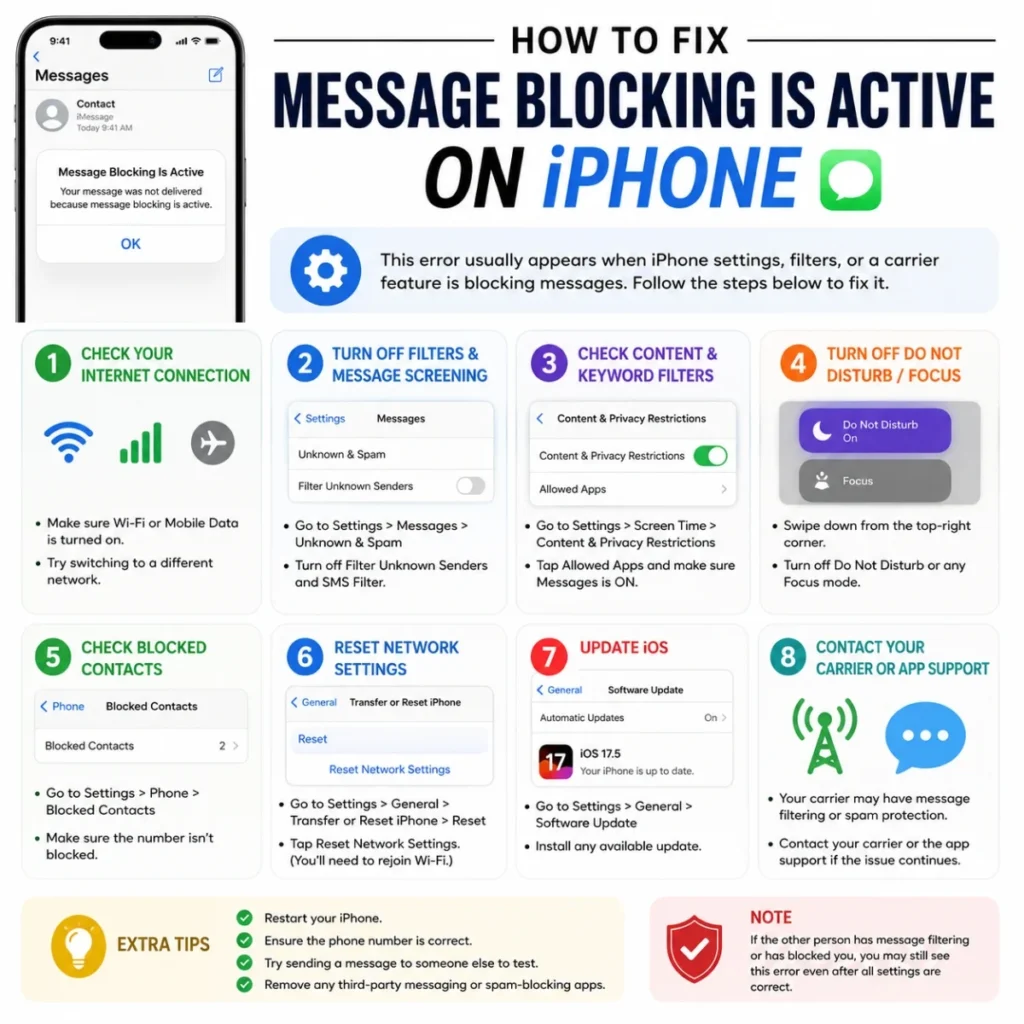
iPhone users should also review a few important settings.
✅ Enable SMS Messaging
Open:
Settings → Apps → Messages
Then confirm:
- 📩 SMS Messaging is enabled (if available with your carrier)
- 💬 iMessage is configured correctly
- 📶 Cellular service is active
✅ Update Carrier Settings
Carrier updates often resolve messaging problems.
To check:
- ⚙️ Open Settings
- ℹ️ Tap General
- 📱 Select About
- 🔄 Install any available carrier update
✅ Reset Network Settings
If the problem continues:
Go to:
Settings → General → Transfer or Reset iPhone → Reset → Reset Network Settings
This removes saved Wi-Fi passwords, so keep them available before resetting.
📞 Contact Your Mobile Carrier
If none of the previous steps work, the issue may be on your carrier’s side.
Ask them to verify:
- 💳 Your account status
- 📶 SMS service activation
- 🚫 Any messaging restrictions
- 🌍 International texting permissions
- 📡 Current network outages
Many carrier-related problems can only be resolved after they refresh or reactivate messaging on your account.
💬 Quick Troubleshooting Checklist
Before moving to advanced solutions, review this checklist.
✅ Basic Checks
- 📱 Restart your phone.
- 📶 Confirm you have a mobile signal.
- 💳 Make sure your SIM card is active.
- 📩 Verify the recipient’s phone number.
- 🚫 Check blocked contacts.
- 🔄 Update carrier settings.
- 📡 Test sending a message to another contact.
- 📞 Contact your mobile carrier if the problem continues.
“Most message blocking issues are resolved by checking your account, network connection, or messaging settings.”
🔧 Advanced Ways to Fix Message Blocking Is Active
If the basic troubleshooting steps did not solve the problem, try these advanced solutions. Often, a small setting or account issue is responsible.
⚙️ Check Your Messaging App
Sometimes the problem is caused by the messaging app rather than your mobile network.
✅ Things to Verify
- 📱 Make sure your default messaging app is selected.
- 🔄 Update the messaging app to the latest version.
- 🧹 Clear the app cache if you use Android.
- 📥 Install pending system updates.
If the app continues to malfunction, switching temporarily to another SMS app can help determine whether the issue is app-related.
📡 Turn Airplane Mode On and Off
Refreshing your network connection can solve temporary communication issues.
📋 Steps
- ✈️ Turn on Airplane Mode.
- ⏳ Wait about 30 seconds.
- 📶 Turn Airplane Mode off.
- 📩 Try sending the message again.
This forces your phone to reconnect to the mobile network.
🔄 Reset Network Settings
Incorrect network settings may prevent SMS services from working correctly.
📱 Android
Depending on your phone model:
Settings → System → Reset Options → Reset Wi-Fi, Mobile & Bluetooth
🍎 iPhone
Settings → General → Transfer or Reset iPhone → Reset → Reset Network Settings
Remember that resetting network settings removes saved Wi-Fi networks and Bluetooth connections.
🚫 Check Blocked Contacts
A blocked contact may prevent successful messaging.
✅ Android
- 📱 Open the Phone or Messages app.
- ⚙️ Open Blocked Numbers.
- 👤 Review the contact list.
🍎 iPhone
- ⚙️ Open Settings.
- 📞 Tap Phone.
- 🚫 Select Blocked Contacts.
Remove the contact if necessary and test messaging again.
💳 Verify Your Mobile Account
Many messaging problems originate from account-related restrictions.
📋 Confirm These Items
- 💰 Your monthly bill is paid.
- 📶 Your line is active.
- 📱 SMS service is enabled.
- 🌍 International texting is allowed if needed.
- 📦 Your prepaid balance has not expired.
A quick call or online account check often confirms these details.
🌍 Message Blocking Is Active on Popular Carriers
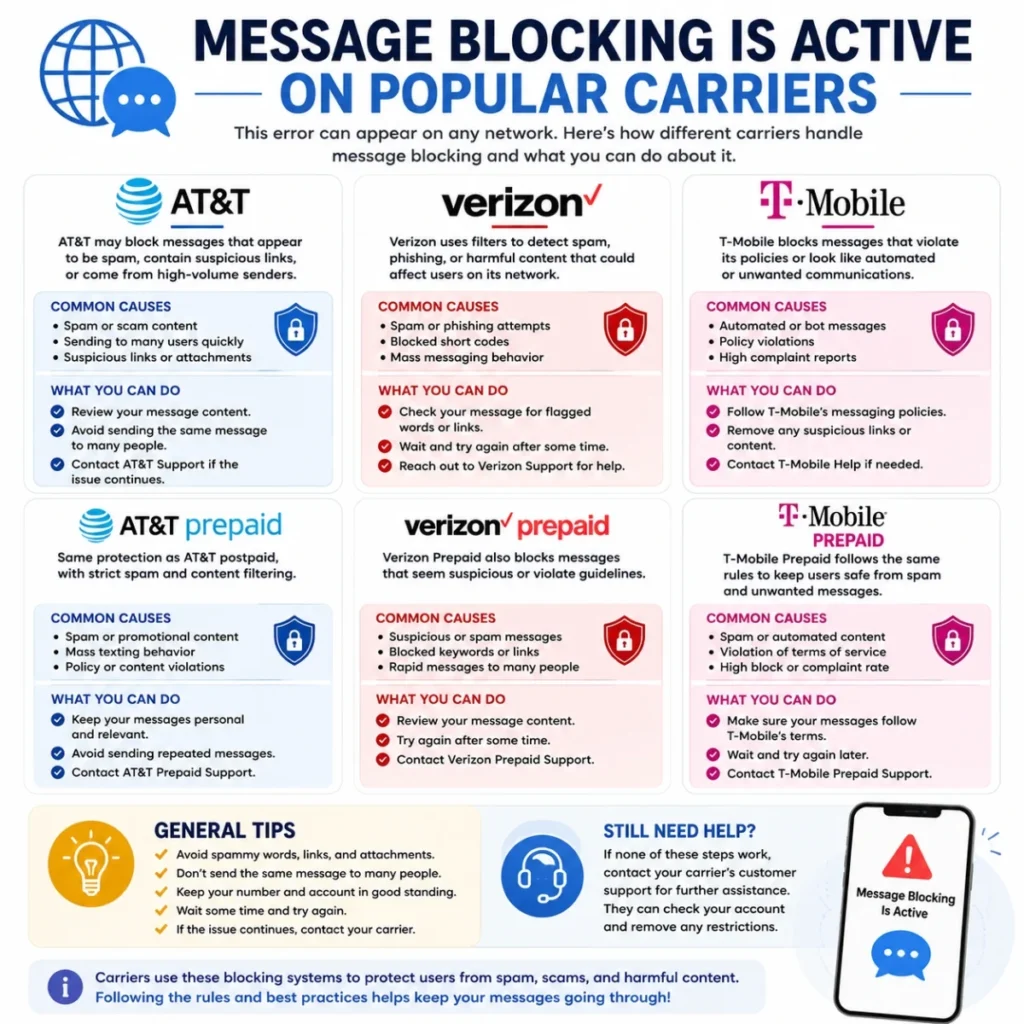
Different mobile providers may display this error for different reasons.
📱 T-Mobile
Possible causes include:
- 🚫 Line restrictions
- 💳 Billing issues
- 📶 Temporary network outages
- 📩 SMS service not activated
📱 Verizon
Common reasons include:
- 📡 Carrier maintenance
- 🚫 Blocked numbers
- 📱 SIM activation issues
- ⚙️ Network configuration problems
📱 AT&T
You may encounter the error because of:
- 💰 Payment issues
- 📶 Service interruptions
- 📩 Messaging feature restrictions
- 🔄 Account changes
📱 Other Carriers
Regional providers may also block outgoing messages when:
- 📡 The network is temporarily unavailable.
- 💳 The account requires verification.
- 🌍 Roaming restrictions apply.
- 📱 The SIM card has not been activated correctly.
🌎 Real-Life Situations That Trigger This Error
The message blocking is active notification often appears after everyday changes.
📲 After Switching Phones
When moving your SIM card to a new device:
- 📱 Carrier settings may need updating.
- 📡 The SIM may require reactivation.
- 🔄 Network registration may take time.
🌍 While Traveling
International travel sometimes affects messaging.
Possible reasons include:
- ✈️ Roaming disabled
- 🌍 International SMS restrictions
- 📶 Unsupported carrier agreements
🔄 After Changing Carriers
If you recently transferred your phone number:
- 📩 SMS activation may still be processing.
- 📡 Porting may not be complete.
- 📱 Carrier settings may need updating.
🛠️ Additional Troubleshooting Tips
Small checks can sometimes solve the problem immediately.
✅ Verify Date and Time
Incorrect date and time settings occasionally interfere with network services.
Enable:
- ⏰ Automatic Date & Time
- 🌍 Automatic Time Zone
✅ Update Your Phone
Software updates often include important network improvements.
Check for:
- 📱 Android updates
- 🍎 iPhone iOS updates
- 📡 Carrier configuration updates
✅ Remove and Reinsert the SIM Card
Power off your phone before removing the SIM.
Then:
- 🧹 Clean the SIM gently.
- 💳 Reinsert it securely.
- 🔄 Restart the phone.
❌ Common Mistakes to Avoid
Many users accidentally make troubleshooting harder.
🚫 Avoid These Mistakes
- ❌ Resetting the phone before checking your carrier.
- ❌ Ignoring unpaid account balances.
- ❌ Assuming the recipient’s phone is the problem.
- ❌ Sending repeated messages while the network is unavailable.
- ❌ Forgetting to verify blocked contacts.
🌟 Tips to Prevent the Error in the Future
Although the issue cannot always be avoided, these habits reduce the chances of seeing it again.
💚 Good Practices
- 📱 Keep your phone updated.
- 💳 Pay your mobile bill on time.
- 📶 Maintain a strong cellular signal.
- 🔄 Install carrier updates promptly.
- 📩 Review messaging settings after switching devices.
- 🌍 Confirm roaming options before international travel.
💡 A Helpful Reminder
Technology does not always work perfectly.
Fortunately, most message blocking is active errors are temporary and can be resolved with simple troubleshooting.
Start with the easiest solutions first.
Then move to account checks and carrier support only if needed.
“Patience and a step-by-step approach often solve messaging problems much faster than guessing.”
🛡️ Ways to Prevent the Message Blocking Is Active Error
Although you cannot prevent every network issue, a few simple habits can reduce the chances of seeing the message blocking is active error again.
📱 Keep Your Phone Updated
Software updates often include fixes for messaging and network performance.
Best Practices
- 📲 Install Android or iPhone updates regularly.
- 📡 Accept carrier settings updates when available.
- 🔄 Restart your phone after major updates.
- ⚙️ Keep your messaging app updated.
💳 Maintain an Active Mobile Account
Carrier restrictions are one of the most common causes of this error.
Account Tips
- 💰 Pay your mobile bill before the due date.
- 📶 Make sure your line remains active.
- 📩 Verify that SMS services are included in your plan.
- 🌍 Enable international messaging if you travel.
📡 Use a Reliable Network Connection
Weak signal strength can interrupt text message delivery.
Helpful Suggestions
- 📶 Move to an area with stronger coverage.
- 🏠 Avoid sending messages from locations with poor reception.
- ✈️ Toggle Airplane Mode if the signal seems stuck.
- 📲 Test your connection by making a phone call.
💡 Expert Tips for Faster Troubleshooting
When the problem appears unexpectedly, these quick checks can save time.
✅ First Things to Check
- 📱 Restart your phone.
- 📶 Confirm your mobile signal.
- 💳 Verify your SIM card.
- 📩 Test another contact.
- 🚫 Review blocked contacts.
- 🔄 Check for carrier updates.
- 📞 Contact your carrier if the problem continues.
🚀 When to Contact Your Carrier
If none of the basic or advanced fixes work, your carrier should investigate the issue.
They can verify:
- 📡 SMS service status
- 💳 Account restrictions
- 🌍 Roaming permissions
- 📱 SIM activation
- 🚫 Network outages
A carrier representative can often identify account-related problems within minutes.
🌍 Frequently Asked Questions About Message Blocking Is Active
❓ What does “message blocking is active” mean?
It means your phone or mobile carrier is preventing an SMS or MMS message from being sent.
❓ Why am I seeing the message blocking is active error?
The most common causes include carrier restrictions, blocked numbers, SIM card problems, account issues, incorrect messaging settings, or temporary network outages.
❓ Can a blocked contact cause this error?
Yes. If you have blocked the recipient—or they have blocked you in some situations—your messages may fail to send.
❓ Will restarting my phone fix message blocking is active?
Sometimes. Restarting refreshes your network connection and can resolve temporary software or carrier communication issues.
❓ Does this error affect Android and iPhone?
Yes. Both Android and iPhone users can experience the message blocking is active error, although the troubleshooting steps may differ slightly.
❓ Can an unpaid phone bill cause message blocking?
Yes. Some mobile carriers suspend outgoing text messaging if your account becomes overdue or restricted.
❓ Should I contact my carrier?
Yes. If basic troubleshooting does not solve the issue, your carrier can confirm whether the problem is related to your account, SIM card, or network.
🌍 Conclusion
The message blocking is active error can seem frustrating at first. However, it is usually caused by a network setting, account restriction, SIM card issue, or messaging configuration rather than a serious device problem.
📱 Start with the simple solutions.
📶 Check your network connection.
💳 Verify your account status.
📞 Contact your carrier if the issue continues.
By following a logical troubleshooting process, most users can restore text messaging without replacing their phone or SIM card.
Moreover, keeping your device updated, maintaining an active mobile account, and reviewing your messaging settings regularly can help prevent similar issues in the future.
📩 “Most messaging problems have a practical solution. A few careful checks are often all it takes to get your texts flowing again.”